Speech Annotation Tool
Project Overview
The Speech Annotation Tool is a production-ready web application designed for data annotation teams to review and correct ASR (Automatic Speech Recognition) transcriptions efficiently and safely. Built for teams working with speech-to-text accuracy improvement, the platform combines intelligent background job processing, real-time progress tracking, browser-based session persistence, and smart row locking to deliver a reliable, responsive workflow that keeps annotators productive without blocking the UI.
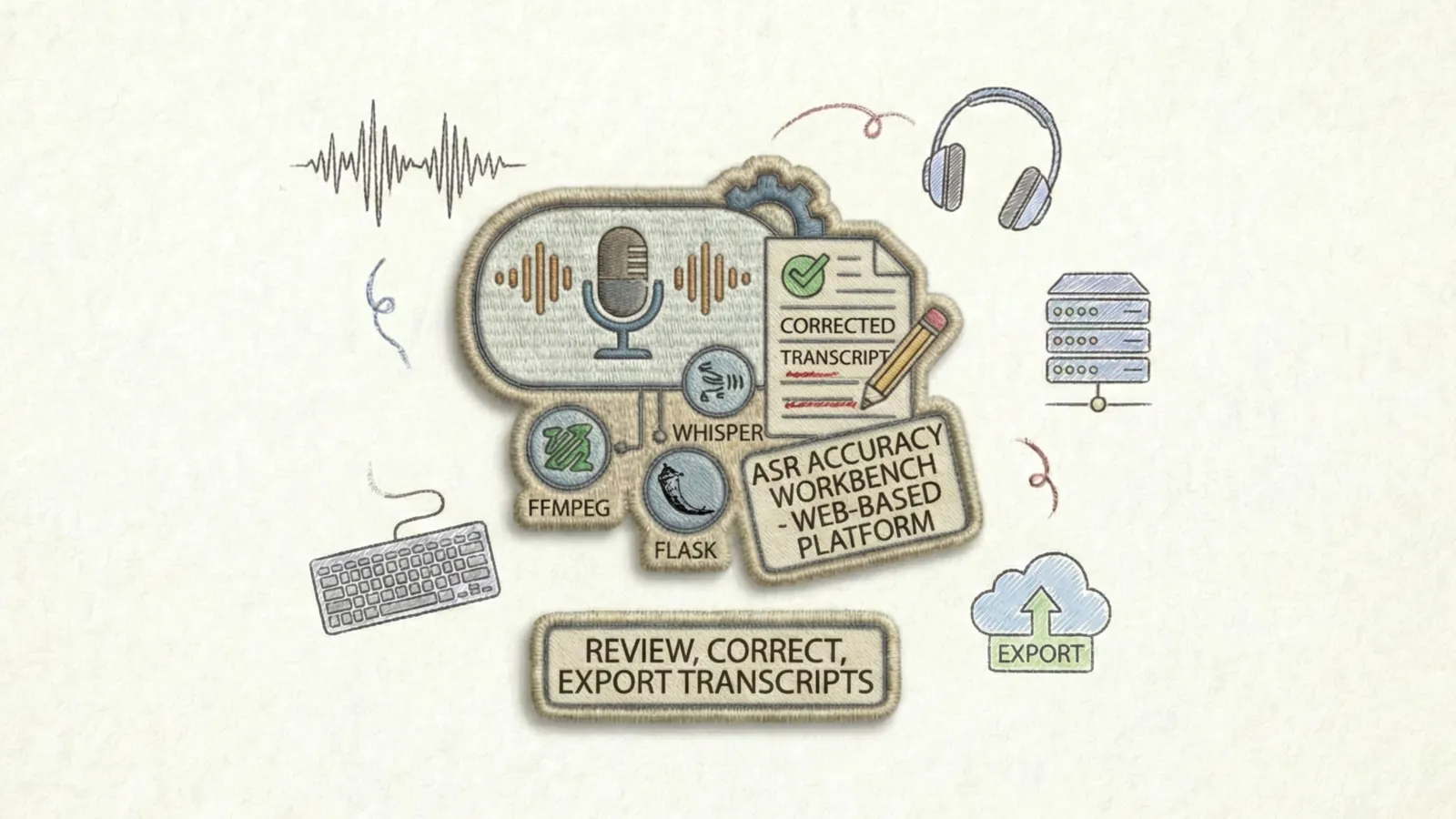
The tool elegantly solves the transcription review bottleneck by supporting two distinct workflows: Review & Correct for teams with pre-chunked audio and existing Excel transcripts, and Auto-Transcribe for starting from scratch with raw audio files. Everything runs on a lightweight Flask stack with no external job queue required-threading-based background jobs, CSV-based persistence, and localStorage-based session tracking keep the entire system simple to deploy and maintain while remaining powerful enough for production use.
The Challenge
Data annotation teams working with audio transcriptions face several critical problems:
- Blocking UI during Long Operations: Processing hundreds of audio files shouldn't freeze the interface
- Progress Visibility: Teams need real-time feedback on job status and completion percentage
- Accidental Overwrites: When corrections are finalized, they must be protected from accidental edits
- Session Loss: Corrections made to dozens of rows should survive browser refresh
- Data Export Flexibility: Results must be downloadable in multiple formats on demand
- Audio Format Chaos: Raw audio arrives in dozens of formats (MP3, WAV, WMA, OPUS, FLAC, M4A, etc.)
- Quality Assurance: Human reviewers must have confidence in what they're correcting
- No Infrastructure Overhead: Deployment shouldn't require Celery, Redis, or message brokers
Technical Architecture
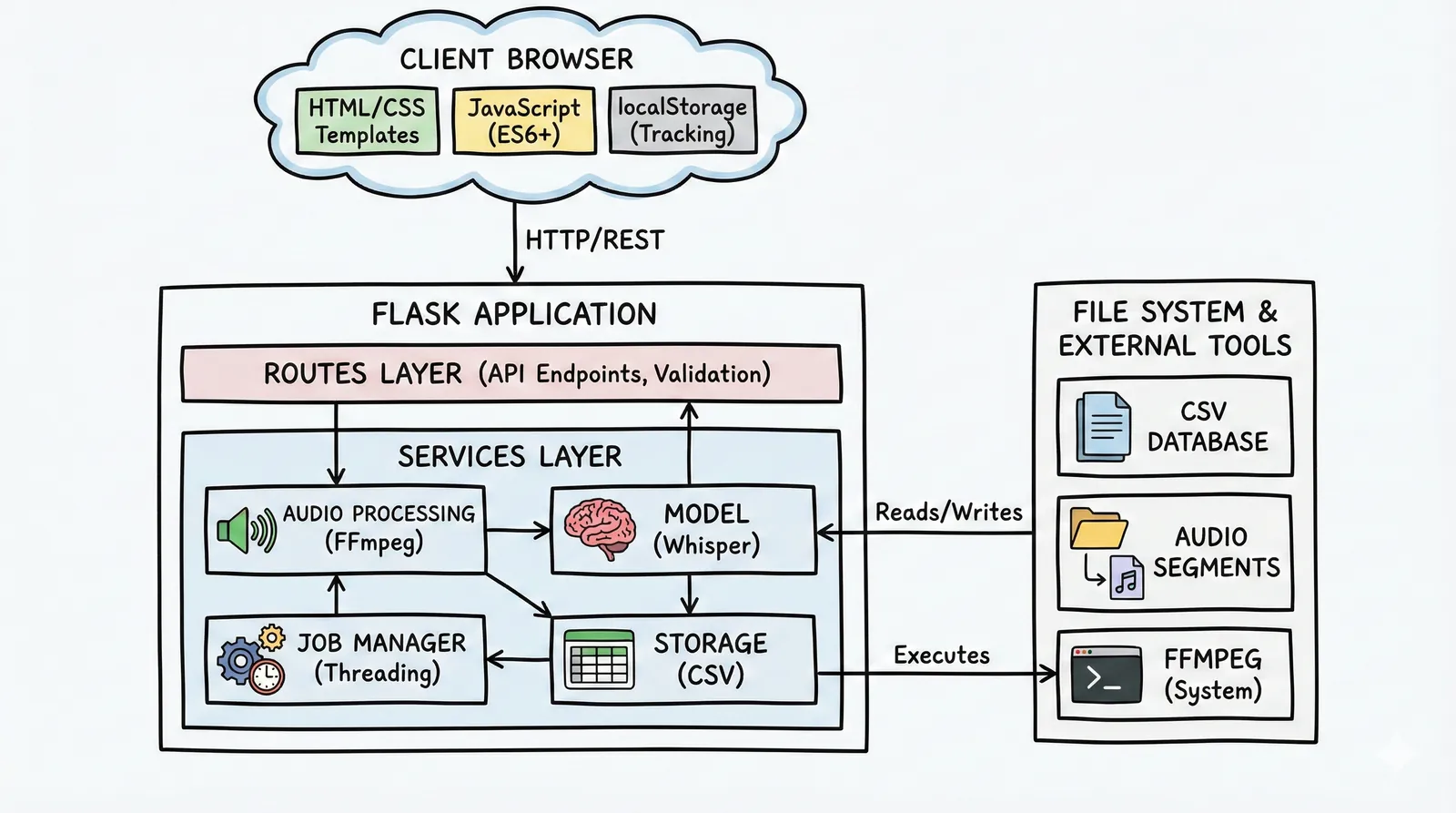
Audio Input → Format Detection → FFmpeg Conversion → Segmentation → Whisper Transcription → CSV Storage → Web UI → Export
Core System Components
Backend Framework
Speech Processing
Background Jobs
Frontend
Key Features & Capabilities
Two Purpose-Built Workflows
The platform supports distinct workflows optimized for different data scenarios:
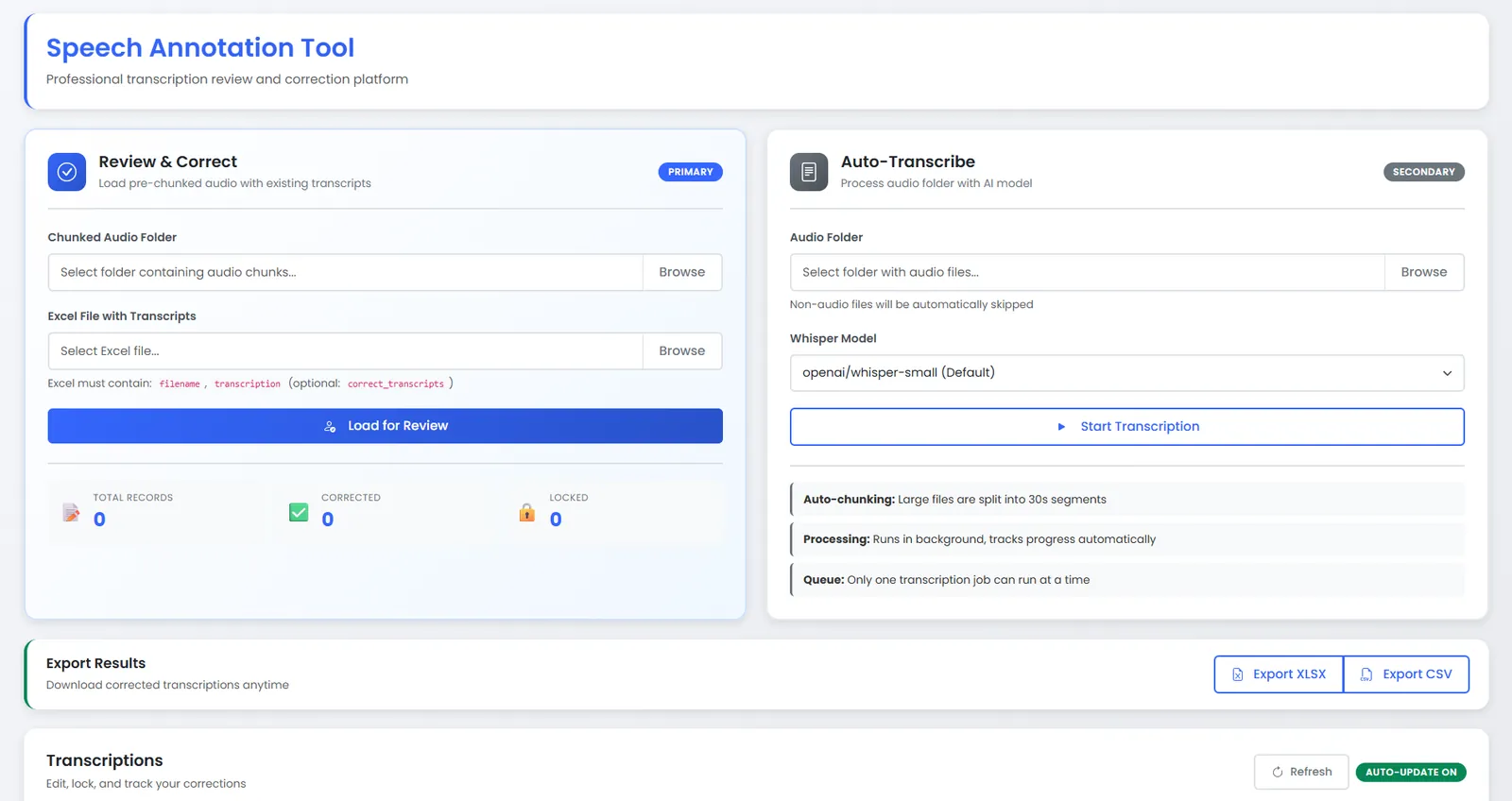
- Review & Correct (Primary): Load pre-chunked audio with Excel transcripts, review in-table, save with autosave, lock when finalized
- Auto-Transcribe (Secondary): Point to any folder of audio files, automatic FFmpeg chunking (30-second segments), Whisper transcription, background progress tracking
Advanced Background Job System
- Threaded Execution: Jobs run in daemon threads without blocking the Flask web server
- Type-Based Locking: Only one job per type (TRANSCRIBE, MANUAL_IMPORT) can run simultaneously, preventing conflicts
- Progress Reporting: Real-time progress updates with percentage completion and item counters
- JSON Persistence: Job status survives application restarts; no external storage required
- Error Handling: Graceful failure tracking with detailed error messages for debugging
Intelligent Progress Tracking
- Auto-Updating Banner: Smart progress bar that appears during active jobs and auto-dismisses on completion
- 2-Second Polling Cadence: Frontend polls job status every 2 seconds for responsive UX
- Item-Level Granularity: Shows "X of Y items processed" for intuitive progress understanding
- Status Lifecycle: pending → running → completed/failed with clear visual indicators
Session Persistence & Correction Tracking
- localStorage Tracking: Browser-based storage tracks every correction made, survives refresh and restart
- Correction Metadata: Stores original text, corrected text, timestamp, and completion status
- Statistics Dashboard: Real-time counters showing total records, corrected records, and locked records
- Privacy-First: All tracking happens locally in the browser; no server-side session overhead
Smart Row Locking
- Prevent Accidental Edits: Lock rows when finalized to make them read-only with yellow highlighting
- Lock Timestamps: Track when each row was locked for audit purposes
- Toggle Unlock: Reviewers can unlock if changes needed; all edits are tracked
- Bulk Operations Ready: Architecture supports future batch lock/unlock operations
Audio Processing Intelligence
- Format Auto-Detection: Supports MP3, WAV, WMA, MPEG, OPUS, FLAC, M4A, and more via FFmpeg
- Smart Conversion: Automatically converts any audio to 16kHz mono WAV for Whisper consistency
- Fixed Segmentation: Chunks audio into configurable segments (default 30 seconds) for manageable processing
- Streaming Architecture: FFmpeg streaming avoids loading entire files into memory, enabling massive file support
- Browser Playback: Each segment can be played directly in the browser for manual verification
Flexible Data Import & Export
- Excel Ingestion: Bulk import pre-chunked data via Excel with required columns validation
- Column Enforcement: Checks for required columns (filename, transcription) before import
- Multi-Format Export: Download as CSV or XLSX (Excel) anytime, includes all corrections and metadata
- Instant Downloads: Export operations complete in milliseconds regardless of dataset size
Implementation Highlights
class JobManager:
    """
    Singleton managing all background jobs with threading
    Type-based locking prevents concurrent job conflicts
    """

    def run_job_async(self, job_id, job_type, task_func, total_items):
        # Check if another job of this type is running
        can_start, active_id = self.can_start_job(job_type)
        if not can_start:
            return {'error': 'Job already running',
                    'active_job_id': active_id}

        # Create job info
        job_info = self.create_job(job_id, job_type, total_items)

        # Spawn daemon thread
        def wrapper():
            try:
                self.start_job(job_id)
                result = task_func(job_id, self)
                self.complete_job(job_id, result)
            except Exception as e:
                self.fail_job(job_id, str(e))

        thread = Thread(target=wrapper, daemon=True)
        thread.start()
        return job_info

    def update_progress(self, job_id, processed, total):
        """Called by task to report progress"""
        self._jobs[job_id]['processed_items'] = processed
        self._jobs[job_id]['progress'] = int((processed / total) * 100)
self._persist_jobs() # Save to JSONdef auto_transcribe_workflow(job_id, job_manager):
"""
Complete auto-transcribe pipeline:
Folder → Audio Files → FFmpeg Convert → Segment → Whisper → CSV
"""
audio_files = list(iter_audio_files(folder_path))
job_manager.update_progress(job_id, 0, len(audio_files))
for idx, audio_file in enumerate(audio_files):
# Step 1: Convert to standardized WAV
wav_path = convert_to_wav(audio_file, job_id)
# Step 2: Segment into 30-second chunks
segments = segment_audio(wav_path, job_id, segment_seconds=30)
# Step 3: Transcribe each segment
model = load_model(model_name) # LRU cached
for segment in segments:
transcript = transcribe_file(model, segment)
# Step 4: Store in CSV
append_record({
'filename': segment,
'transcription': transcript,
'job_id': job_id
})
# Step 5: Report progress
job_manager.update_progress(job_id, idx + 1, len(audio_files))class CorrectionTracker {
/**
* Manages localStorage-based correction history
* Tracks which records were edited and what changes made
*/
constructor() {
this.storageKey = 'asr_corrections_tracker';
this.tracker = this.loadFromStorage();
}
markCorrected(recordId, originalText, correctedText) {
this.tracker[recordId] = {
corrected: true,
originalText,
correctedText,
timestamp: new Date().toISOString()
};
this.saveToStorage();
}
getStats() {
const total = Object.keys(this.tracker).length;
const corrected = Object.values(this.tracker)
.filter(r => r.corrected).length;
return { total, corrected };
}
}Performance Metrics
Workflow Capabilities
| Workflow | Use Case | Input | Processing |
|---|---|---|---|
| Review & Correct | Teams with pre-chunked audio | Audio folder + Excel file | Direct table load, inline edit, save |
| Auto-Transcribe ⭐ | Starting from raw audio | Audio folder (any format) | Convert → Segment → Transcribe → Show results |
Live Demo
See the System in Action
Watch how the tool handles background transcription jobs, live progress updates, and responsive UI interactions without blocking the interface.
Deployment Options
The system is deployment-ready with simple configurations for multiple platforms. No Celery, Redis, or message brokers required-just Python, Flask, and FFmpeg.
Quick Deploy
# Clone and setup
git clone https://github.com/inboxpraveen/Speech-Annotation-Tool.git
cd Speech-Annotation-Tool

# Create virtual environment
python -m venv venv
source venv/bin/activate  # Windows: venv\Scripts\activate

# Install dependencies
pip install -r requirements.txt

# Run application
python app.py
# Open http://localhost:5000
Also Supports
- Gunicorn: Production WSGI server with multi-worker support
- Docker: Containerized deployment with pre-installed FFmpeg and dependencies
- Systemd: Service files for long-running instances on Linux servers
- Cloud: Compatible with any cloud provider (AWS, Heroku, Railway, Render)
Technical Challenges & Solutions
Challenge 1: Non-Blocking Background Jobs Without External Infrastructure
Transcribing hundreds of files would block the web interface and exhaust memory.
Solution: Implemented Python threading with daemon threads and a singleton JobManager class.
Jobs run independently while the Flask server remains responsive. Type-based locking prevents concurrent conflicts.
Progress persisted to JSON, so status survives restarts.
Challenge 2: Audio Format Chaos
Audio files arrive in dozens of formats (MP3, M4A, OPUS, FLAC, etc.) with varying sample rates and channels.
Solution: Integrated FFmpeg for universal format conversion with intelligent preprocessing.
All audio automatically converted to standardized 16kHz mono WAV before Whisper processing.
FFmpeg streaming prevents memory overflow on large files.
Challenge 3: Session State Without Server Overhead
Tracking which of hundreds of records were corrected would require server sessions.
Solution: Leveraged browser localStorage to track corrections client-side.
CorrectionTracker class stores correction metadata with timestamps. Survives browser refresh,
restart, and network issues without server-side complexity.
Challenge 4: UI Responsiveness During Long Operations
Users need real-time feedback on job progress without page reloads blocking interaction.
Solution: Smart polling strategy with 2-second refresh cadence. Frontend polls job status
via API while UI remains interactive. Progress banner auto-appears and dismisses intelligently.
Silent table refreshes don't interrupt user workflow.
Challenge 5: Data Safety and Accident Prevention
Corrected transcripts must be protected from accidental overwrites by team members.
Solution: Implemented row-level locking with timestamp tracking. Once locked, rows become
read-only and visually highlighted. Lock state persisted in CSV with optional unlock capability.
Audit trail tracking enables debugging of accidental changes.
Architecture Decisions
Why Threading Instead of Celery?
This project deliberately avoids external job queues like Celery. Threading provides:
- Zero Infrastructure: No Redis/RabbitMQ broker required for deployment
- Simpler Debugging: Exceptions and logs all in one Python process
- Fast Iteration: Deploy with single Python command, no daemon management
- Sufficient Scale: Handles thousands of files for team-based annotation
- Type-Based Locking: One job per type prevents conflicts without complex state
For distributed processing across multiple servers, Celery migration path documented in PROJECT_DOCUMENTATION.md.
Why CSV Instead of Database?
- Human-Readable: Data visible in Excel, easily debuggable
- No Setup: No database server required, just files
- Thread-Safe: RLock-based file access prevents corruption under concurrency
- Export-Ready: Already in the format users need for downloads
- Migration Path: Easy to migrate to SQLite or PostgreSQL when scale demands
Key Learnings
- Threading-based jobs are sufficient for team-scale annotation workflows; complexity of Celery only justified at massive scale
- localStorage-based session tracking eliminates server-side session overhead entirely while improving privacy
- Smart UI polling (2-second cadence) balances responsiveness with server load-too frequent causes overhead, too slow feels sluggish
- Row-level locking prevents most annotation errors; much cheaper than fixing mistakes after the fact
- FFmpeg streaming for audio processing enables handling of massive files without memory bloat
- Type-based job locking is simpler and more effective than complex queue systems for single-server deployments
- CSV + pandas is surprisingly powerful for data persistence; premature database migration adds unnecessary complexity
Future Enhancements
- Version 2.1: Multi-user authentication, per-user correction tracking, team dashboards
- Version 2.2: Speaker diarization support, custom Whisper model fine-tuning interface
- Version 2.3: WebSocket-based real-time progress (currently polling)
- Version 3.0: PostgreSQL backend for enterprise deployments, distributed Celery workers
- Future: Batch export with filtering, quality metrics dashboard, annotation team benchmarking